
House Defect Inspection App
for Faster Property Inspections


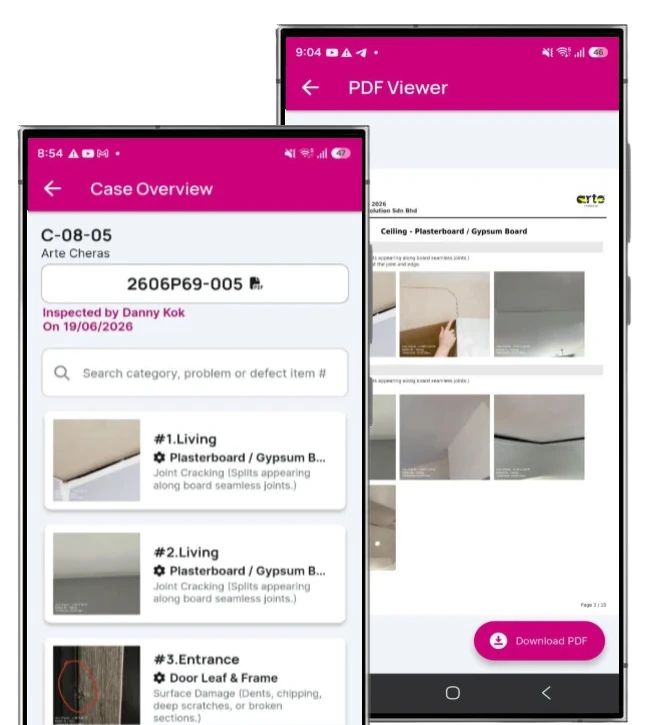
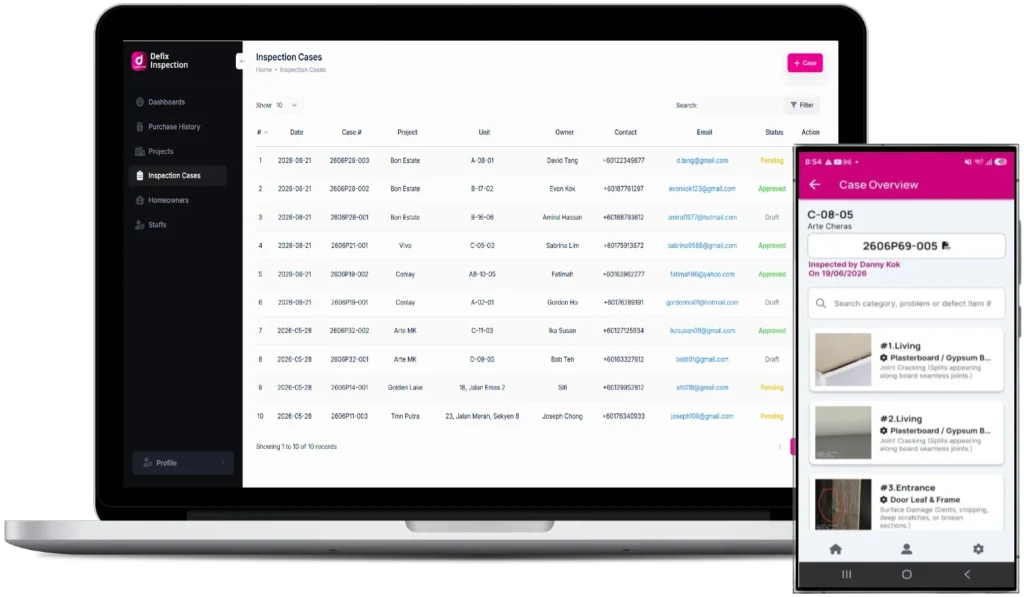
Professional Defect Inspector App
- Defix Inspection is a professional house defect inspection app designed for property inspectors, developers, contractors and inspection teams.
- Conduct a home inspection defects on-site
- Record unlimited house defect items by photos & video
- Generate defects inspection report with own branded cover page
- Homeowners to track defects rectification status in real-time anytime.

Generate Reports Instantly
Eliminate manual entry. Capture defects on-site and instantly generate branded PDF reports.

Total Transparency, Zero Stress
Secure portal lets owners track property progress from open to closed.

Full Project Oversight
Track progress, identify bottlenecks, ensure every unit is defect-free efficiently.

Update Progress w/o App
Contractors upload photos via secure links to close cases instantly.
House Defect Inspection App Features
Unlimited Defect Inspections
Choose a monthly plan based on your inspector team and handle unlimited defects inspection cases, without purchasing case credits.
Unlimited Instant Defects Reports
Generate comprehensive, branded PDF defects inspection reports immediately after the inspection, eliminating hours of manual data entry and report preparation.
App-Free Client & Contractor Access
Share secure web links with homeowners, developers and contractors so they can view relevant information and update defects rectification progress directly from their browser.
Floorplan Defect Pinpointing
Pinpoint each defect directly on the property floorplan, giving homeowners and contractors a clear visual reference to its exact location.
Video Evidence with QR Access
Record up to 30 seconds of video for each defect and include a QR code in the report. Homeowners can scan and instantly watch the corresponding video.
Automated Rectification Tracking
Track every defect from Open to rectification and closure, giving your team a clear view of outstanding work without chasing updates manually.
Custom Company Branding
Apply your company logo and branding across defects inspection reports and client-facing portals to deliver a consistent, premium inspection experience.
Multi-Inspector Team Management
Manage multiple inspectors under one account, with centralized access to inspection cases, reports and team activity.
Automated Report Delivery
Automatically send approved reports and secure access links by email, while maintaining a complete history of changes and activities for accountability and reference.
Live Progress Dashboard
Watch your home defects rectification journey in real-time through a dedicated, easy-to-read web portal.
Secure Password Protection
Your property’s data is private. Access your report only through a unique, encrypted, and password-protected link.
Side-by-Side Comparisons
View "Before" photos from the defects inspection next to "After" photos from the contractor to verify the quality of work.
Instant Report Access
Download the official, professional PDF version of your home defects inspection report anytime, anywhere.
No App Required
Access all defects inspection updates and reports through your mobile or desktop browser, no need to clutter your phone with another app.
Type-by-Type Breakdown
View defects organized by defect types, making it easy to track issues and monitor defects rectification progress efficiently.
Timestamped Evidence
Every inspected defect photo is timestamped, creating a reliable timeline for your home’s warranty records.
Direct Status Visibility
See exactly which items are "Open," "In Progress," or "Closed" without having to call the developer for defects rectification updates.
Real-Time Notifications
Receive instant email updates whenever defect items are successfully rectified or marked as completed.
Project References








How IT Works
Step 1: On-Site Audit
Open a case to conduct a defect inspection, capturing unlimited defects photos and video with industrial-grade precision.
Step 2: Lock & Generate
Finalize the audit to generate a branded PDF defect inspection report. A secure access link and unique passcode are automatically generated and displayed on the report cover page.
Step 3: Handover to Owner
The system instantly delivers the defect inspection report to the homeowner via Email, officially completing the inspection mission.
Step 1: Receive & Review
Receive house defects inspection report via Email. Review the findings and the secure access credentials provided on the cover page.
Step 2: Authorize Access
Pass the defect inspection report (or the link/passcode) to the Developer / Subcontractor to initiate the rectification process.
Step 3: Monitor Progress
Use DeFix Inspection secure portal (active for 180 days) to track real-time updates as the developer’s team fixes each item.
Step 1: Access Case
Receive the house defect Inspection report from the homeowner and use the credentials on the cover to access the digital dashboard.
Step 2: Delegate to Subcons
Assign specific inspected defect items to the relevant subcontractors by sharing the secure web link.
Step 3: Track Compliance
Monitor the progress of all subcontractors through the dashboard to ensure the inspected defects are resolved efficiently.
Step 1: Receive Tasks
Access the assigned house defect list provided by the Developer via the secure web link (no app download required).
Step 2: Repair & Upload
Complete the house defects repair on-site and immediately upload the "Fixed" photo directly through the mobile-friendly portal.
Step 3: Notify Completion
Submit the defects fix to mark the item as "Closed," instantly notifying both the Developer and the Homeowner that the house defect rectification work is finished.
FAQs
1. What does "1 Inspector Seat" mean?
One inspector seat allows one individual to access your Defix Inspection account using their own login. Each user can create and manage inspection cases, record defects, generate reports and track rectification progress. The number of users you can add depends on your subscription plan.
2. How many defects can I record per case?
There is no limit. You can record as many defect items and upload as many photos as necessary to be thorough, all within a single case credit.
3. Can I add more defect items after I submit the report?
No. Once a report is submitted for generation, the defect list is finalized and locked. This ensures that the PDF report and the Live Link shared with the Homeowner and Developer remain an accurate, unchangeable record of the initial inspection.
4. What if I missed a defect and already submitted the report?
Since reports are locked for data integrity, any additional defects found after submission would typically require a new case (supplementary report). We recommend using the “Draft” mode to ensure all items are captured before final submission.
5. Can I still edit the status of an item after submission?
Yes. While you cannot add new defect items, the existing items are “Live.” Subcontractors can update them from “Open” to “Closed” by uploading rectification photos via the web link.
6. Are there any limits on the number of inspection cases I can create?
All subscription plans include unlimited inspection cases during the active subscription period. You can create and manage as many property inspection cases as needed without purchasing individual case credits. Your available inspector seats depend on your selected subscription plan.
7. Is there a limit on photos per defect?
No. We encourage high-detail reporting. You can take multiple angles of a single defect to provide clear instructions for the contractor—all included in your case credit.
8. Does the "Live Link" for subcontractors cost extra?
No. The secure web portal for subcontractors and homeowners to track the locked list of defects is included in the initial case credit.
9. Can I upgrade or change my subscription plan?
Yes. DeFix Inspection offers subscription plans for individual professionals, small inspection teams, and larger inspection organizations. Choose the plan that suits your business needs, with options ranging from one inspector seat to unlimited inspector seats. You can select a suitable plan as your inspection business grows.
10. How long does a case stay active?
The case stays active in your dashboard until every item has been marked as “Closed,” providing you a complete history of the rectification process.
1. Do I need to download an app to see my report?
No app download is required. You can view your report and track progress directly through your web browser. Our portal is fully optimized for mobile devices, giving you the convenience of a “native app” experience without using up any storage on your phone.
2. How do I access my property’s live dashboard?
A unique, secure web link and a private password will be sent directly to you via Email as soon as the inspection is submitted. Simply tap the link on your smartphone to see the real-time status of your home’s rectification. Please be noted that the link will stay active for your access for a period of 180 days, after which it will be disabled.
3. How do I know the "After" photos are actually from my home?
The system creates a side-by-side comparison. Every “After” photo is tied directly to the specific defect’s “Before” photo and location (e.g., Master Bedroom), ensuring total transparency and verification of the repair.
4. Can I view the report on the go?
Yes! The web portal is designed for mobile-friendly viewing. Whether you are at work or on the move, you can check the latest updates on your phone with the same ease as scrolling through a social media feed.
5. Why is the defect list "locked" once I receive the link?
To protect you and the developer, the list is finalized upon submission. This ensures the report is a professional, tamper-proof document of the property’s condition at the time of inspection, serving as a reliable “Single Source of Truth.”
6. What if I find a new defect after the report is submitted?
Since the original report is locked for data integrity, any new issues found later will require a supplementary inspection. This ensures that every report remains an accurate, timestamped record for warranty purposes.
7. How do I get a formal copy for my records?
Inside your mobile-friendly web portal, there is a “Download PDF” button. You can save the full, professional report to your phone or computer at any time for your permanent digital archive.
8. Is my property data and privacy protected?
Security is our priority. Your property data is hosted on encrypted servers, and access is strictly limited to those with the unique link and password provided by the inspector.
9. What do the "Open" and "Closed" statuses mean?
- Open: The defect has been recorded by your inspector and is currently awaiting repair by the relevant contractor.
- Closed: The subcontractor has uploaded a photo of the fix and marked the item as resolved.
Note that the “Closed” status is updated by the contractor once they complete their work, pending final verification by the developer’s representative. It is recommend that homeowners consult directly with the developer regarding the final quality and official sign-off of the fixed defects.
10. Do I have to pay to use the tracking portal?
No. This service is provided to you by your property inspection provider as part of their commitment to a high-quality, transparent home-buying experience.
1. What is a house defect inspection?
A house defect inspection is a systematic inspection of a property to identify, document and report construction defects, workmanship issues and functional problems. It typically covers areas such as walls, floors, ceilings, tiles, doors, windows, plumbing, electrical fittings, bathrooms and other accessible parts of the property.
2. What are the most common defects found during a house inspection?
Common house defects include wall and ceiling cracks, hollow or damaged tiles, uneven flooring, water leakage, dampness, poor waterproofing, plumbing problems, defective doors and windows, drainage issues, poor paintwork and other workmanship defects. The actual defects vary depending on the property’s age, design, construction and condition.
3. When should I conduct a house defect inspection?
For a new property, it is best to conduct a house defect inspection soon after Vacant Possession or key handover and before major renovation or installation work begins. This allows defects to be identified while the original condition of the property is still visible and gives homeowners time to report defects within the applicable Defect Liability Period (DLP).
4. What does a house defect inspection check?
A typical house defect inspection checks walls, ceilings, floors, tiles, doors, windows, bathrooms, plumbing, drainage, electrical fittings, kitchen areas, external areas and general workmanship, depending on the property type and agreed inspection scope.
5. Do I need a professional house defect inspector?
A professional house defect inspector can help identify and systematically document defects that may be overlooked during a normal walkthrough. A structured inspection also helps organise photographs, locations and defect descriptions for follow-up with the developer or contractor.
6. What should be included in a house defect inspection report?
A house defect inspection report should clearly document the location of each defect, a description of what was observed, photographs or other supporting evidence, and relevant inspection details. Organising defects by room or area can make it easier to submit them to the developer and track subsequent rectification.
7. What are the most important defects to check in a new house?
When inspecting a new house, pay particular attention to water leakage, significant cracks, hollow or damaged tiles, drainage problems, plumbing leaks, electrical concerns, defective doors and windows, waterproofing issues and poor workmanship. Cosmetic defects such as paint and finishing problems should also be documented where relevant.
8. Can a house defect inspection help with developer defect claims?
Yes. A properly documented defect inspection can help homeowners clearly communicate identified defects to the developer by providing organised descriptions, locations and photographic evidence. Homeowners should also keep copies of their inspection report, defect submissions and communications with the developer.
9. Should I inspect my house before renovation?
A house defect inspection should ideally be completed before major renovation, built-in cabinets, furniture installation or other alterations. Renovation can cover or change the original condition of walls, floors, plumbing and other areas, making it harder to identify and document original construction defects
10. How can I record and track house defects after an inspection?
House defects can be recorded using photographs, videos, descriptions, room or area locations, floorplan markers and defect status. A digital defect inspection system can then track each defect from initial inspection through rectification and final verification.